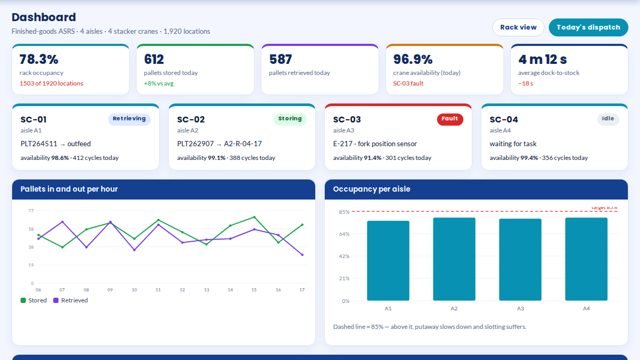
The screen
What it looks like in MOS
Rack and bin occupancy, stock by part number, put-away and picking tasks, and ASRS crane status in one view — for raw-material stores and finished goods alike.
Know what is on every rack before anyone walks there.
Rack and bin occupancy, stock by part number, put-away and picking tasks, and ASRS crane status in one view — for raw-material stores and finished goods alike.
Rack and bin occupancy, stock by part number, put-away and picking tasks, and ASRS crane status in one view — for raw-material stores and finished goods alike.
Available as a module on the MOS platform, configured to your stations and people during installation.
Racks, bins and locations set up as they stand.
Material is scanned in and put away to a suggested bin.
Picking lists follow FIFO and send people to the right bin.
Stock is always the sum of scans, not a guess.
Every figure comes from the machine, the camera or the station itself — recorded as it happens, not typed in at the end of the shift.
Where to put and where to pick
What material is available now
What is running low
Stock value by location
Barcode or RFID scanners for receiving, put-away and picking.
A label on every bin and location.
The MOS plant server; ASRS controllers connected where present.
Locations and bins labelled and loaded.
Every receipt put away to a suggested bin.
Picks follow FIFO; stock is always the sum of scans.
No. MOS keeps the shop-floor truth by location and hands totals to the ERP.
MOS talks to the ASRS controller for put-away and picking tasks and shows its status.
Every trolley, every gate, every movement — on its own.
See the module →Every machine, live — and the real reason it stopped.
See the module →Every unit scanned at every station. Nothing skips a stage.
See the module →Tell us about your plant and what you want to see. We visit, connect one machine or station, and you watch your own data in MOS before anything is quoted.