MOS / Modules / Workforce
Running in production

Operator Verification with AI

The right trained operator at every critical station — even in mask and goggles.

Request a POCSee the screen
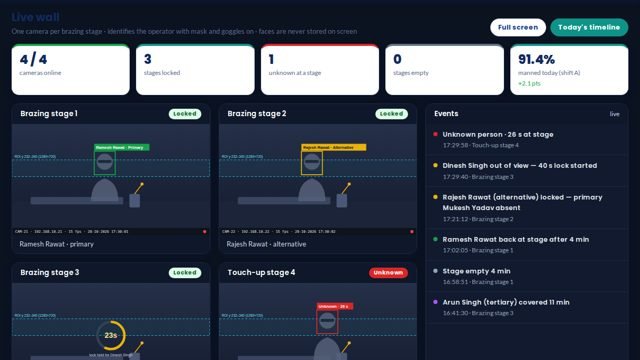
Operator Verification with AI screen 1 in MOS
The screen

What it looks like in MOS

A camera at each critical stage recognises the operator and checks that they are trained and allowed there. It logs who worked where and for how long — primary, alternate, someone else or an unknown face — and how long a stage stood empty, with daily and monthly reports.

Download the one-pagerRequest a POC
What it does

In plain words

A camera at each critical stage recognises the operator and checks that they are trained and allowed there. It logs who worked where and for how long — primary, alternate, someone else or an unknown face — and how long a stage stood empty, with daily and monthly reports.

What it does for you
  • Recognises operators wearing masks and safety goggles
  • Primary, alternate, other and unknown at each stage
  • Empty-stage time
  • Alerts when an untrained person takes a critical stage
  • Daily and monthly presence reports
  • Runs on a GPU inside the plant

What it connects to

  • IP cameras at each stage
  • A GPU machine on the plant network

Where it runs today

  • Brazing stages on a room-AC line — operators recognised with masks and goggles on
How it works

From the shop floor to the screen, in four steps

Enrol

Each operator is enrolled from a few photos, with the stations they are trained for.

Watch the stage

A camera at each critical stage recognises who is there, even in mask and goggles.

Check

Primary, alternate, someone else or unknown — and whether the stage is empty.

Report

Presence by stage and shift, with alerts when an untrained person takes a critical stage.

The screens

What you see in MOS

  1. Stage board — who is at each stage now
  2. Presence timeline per stage
  3. Exceptions — unknown, untrained, empty
  4. Daily and monthly reports
  5. Enrolment
The numbers

What it measures for you

Presence by stage and shiftEmpty-stage timeUnknown and untrained eventsPrimary versus alternate cover

Every figure comes from the machine, the camera or the station itself — recorded as it happens, not typed in at the end of the shift.

Who uses it

Everyone sees what their job needs

Supervisor

Who is where, right now

Quality

Proof the right person did each critical job

HR

Presence by stage, day and month

Plant head

Untrained-person exceptions

On site

What is needed in your plant

At each stage

An IP camera facing where the operator stands.

In the plant

A GPU machine on the plant network that does the recognition.

For enrolment

A few photos of each operator, taken once.

Rollout

From the first day to the first month

Day one

Cameras placed

Critical stages chosen; cameras aimed and tested.

Week one

Operators enrolled

Every operator enrolled with the stages they are trained for.

Month one

Presence reports

Exceptions, empty-stage time and monthly reports running.

Questions

Asked about Operator Verification with AI

Does it work with masks and goggles?

Yes — it was built on brazing stages where operators wear both.

Where are the face images kept?

On the plant's own GPU machine and server, inside the plant network.

Works with

The rest of MOS

Request a POC

See it on your own machine.

Tell us about your plant and what you want to see. We visit, connect one machine or station, and you watch your own data in MOS before anything is quoted.

  • A plant visit to see the line and the problem
  • One machine or station connected as a proof of concept
  • Your own data, live, on MOS screens
  • Scope, modules and timeline agreed in writing only after that
Thank you — request received.We will call you shortly to plan the visit.