MOS / Modules / Production
Running in production

OEE & Machine Monitoring

Every machine, live — and the real reason it stopped.

Request a POCSee the screen
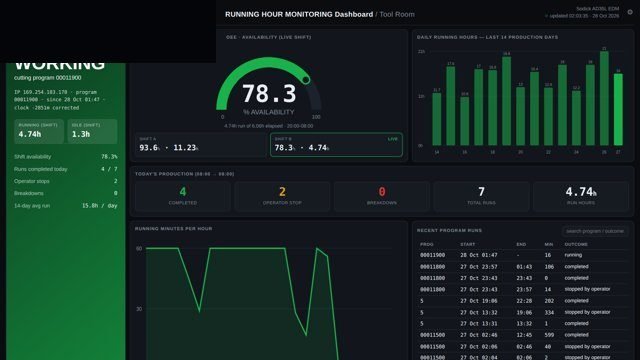
OEE & Machine Monitoring screen 1 in MOS
The screen

What it looks like in MOS

MOS reads the machine itself — its controller, its PC or the files it writes — and shows running, idle and alarm time per machine and per shift. Availability, performance and quality are worked out from what the machine reports, not from what someone remembers at the end of the shift. Stops carry their true cause, so the morning meeting talks about facts.

Download the one-pagerRequest a POC
What it does

In plain words

MOS reads the machine itself — its controller, its PC or the files it writes — and shows running, idle and alarm time per machine and per shift. Availability, performance and quality are worked out from what the machine reports, not from what someone remembers at the end of the shift. Stops carry their true cause, so the morning meeting talks about facts.

What it does for you
  • Running / idle / alarm state per machine, second by second
  • Availability, performance, quality and OEE by shift, day and month
  • Stop reasons from the machine, with operator notes
  • Part counts and cycle times read from the controller
  • Plan versus actual for every shift
  • Alerts when a machine stays down beyond its limit

What it connects to

  • Controllers over the network (Modbus TCP, OPC UA)
  • Machine PCs and the files they write (FTP, shared folders)
  • Excel or CSV logs from test benches

Where it runs today

  • EDM machines in a tool room, read over the network with no change to the machine
  • A lens distortion inspection station — OK / NG per lens and OEE per shift
How it works

From the shop floor to the screen, in four steps

Connect

MOS Connect reads each machine the way it already talks — its controller over the network, its PC, or the files it writes.

Learn the states

Running, idle, alarm and planned stops are mapped once per machine, with the plant's own stop reasons.

Measure every second

States, counts and cycle times are recorded continuously and rolled up by shift, day and month.

Act on it

Long stops raise alerts; the shift report reaches supervisors and the plant head without anyone typing it.

The screens

What you see in MOS

  1. Plant floor — every machine as a live tile
  2. Machine detail — state timeline, counts, alarms
  3. Shift OEE — availability, performance, quality
  4. Losses — stops ranked by time and reason
  5. 14-day trend per machine and per line
The numbers

What it measures for you

OEE, availability, performance, qualityRun, idle and alarm hoursStop count and duration by reasonMTTR and MTBFParts and cycle time

Every figure comes from the machine, the camera or the station itself — recorded as it happens, not typed in at the end of the shift.

Who uses it

Everyone sees what their job needs

Operator

Their machine's state and the reason prompt for each stop

Supervisor

Which machine is down right now, and why

Maintenance

Breakdown history, MTTR and MTBF from real stop times

Plant head

Shift and monthly OEE across lines

On site

What is needed in your plant

On the machine

Nothing changes. Its controller, PC or log files are read as they are.

On the network

The MOS gateway on the machine network, buffering if the link drops.

In the plant

The MOS plant server — screens open in any browser on the network.

Rollout

From the first day to the first month

Day one

First machine live

One machine connected and its states on screen.

Week one

Stops get reasons

Stop reasons agreed with production; shift report starts.

Month one

Every machine, one view

All machines on the floor view; trends and losses running.

Questions

Asked about OEE & Machine Monitoring

Our machines are old. Can MOS read them?

Most machines expose their state somewhere — a controller, a PC, a file or a signal. The gateway reads whichever one is there; for a machine with none, a simple signal tap is added.

Who enters the stop reasons?

The operator picks a reason once when the machine stops; the duration and time come from the machine.

Works with

The rest of MOS

Request a POC

See it on your own machine.

Tell us about your plant and what you want to see. We visit, connect one machine or station, and you watch your own data in MOS before anything is quoted.

  • A plant visit to see the line and the problem
  • One machine or station connected as a proof of concept
  • Your own data, live, on MOS screens
  • Scope, modules and timeline agreed in writing only after that
Thank you — request received.We will call you shortly to plan the visit.