MOS / Modules / Workforce
Proof of concept

Operator Motion Analysis

Every cycle checked against the right way of doing the job.

Request a POCSee the screen
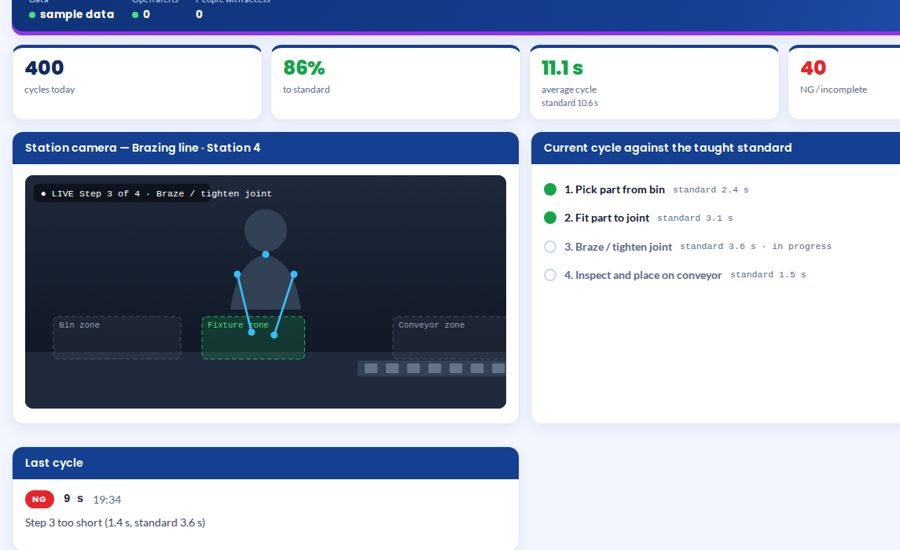
Operator Motion Analysis screen 1 in MOS
The screen

What it looks like in MOS

The best operator does the job a few times in front of the station camera; MOS learns the steps, the zone each happens in, their order and their normal time. From then on every cycle is checked — a skipped step, steps out of order, a step done too quickly to be done properly, or a cycle that ran slow — and marked OK, SLOW, NG or INCOMPLETE with one plain reason.

Download the one-pagerRequest a POC
What it does

In plain words

The best operator does the job a few times in front of the station camera; MOS learns the steps, the zone each happens in, their order and their normal time. From then on every cycle is checked — a skipped step, steps out of order, a step done too quickly to be done properly, or a cycle that ran slow — and marked OK, SLOW, NG or INCOMPLETE with one plain reason.

What it does for you
  • Teach the standard once, by doing it
  • Hands followed by the camera — no wearables
  • OK / SLOW / NG / INCOMPLETE per cycle, one reason each
  • Cycle time against the standard
  • Shift report of every miss and why
  • Runs on an ordinary PC at the station

What it connects to

  • One camera at the station
  • A PC or laptop at the station

Where it runs today

  • Proof of concept on air-conditioner assembly tasks — brazing a pipe joint and tightening a screw
How it works

From the shop floor to the screen, in four steps

Teach

The best operator does the job a few times in front of the station camera.

Learn

MOS learns the steps, the zone each happens in, their order and their normal time.

Check every cycle

Each cycle is compared with the standard as it happens — skipped, out of order, too quick or too slow.

Tell at once

OK, SLOW, NG or INCOMPLETE appears at the station with one plain reason, and is logged.

The screens

What you see in MOS

  1. Live station — hands, zones and the current step
  2. Cycle log with result and reason
  3. The taught standard
  4. Shift report — misses and why
The numbers

What it measures for you

Cycles to standardAverage cycle versus standardMisses by step and reasonCycles per hour

Every figure comes from the machine, the camera or the station itself — recorded as it happens, not typed in at the end of the shift.

Who uses it

Everyone sees what their job needs

Operator

Immediate feedback on each cycle

Supervisor

Which station and which step is being missed

Industrial engineering

Real cycle times against the standard

Quality

Proof that critical steps were done

On site

What is needed in your plant

At the station

One camera that sees the operator's hands and the work area.

On site

A PC or laptop at the station; no sensors on the person.

To teach

Your best operator doing the job a few times.

Rollout

From the first day to the first month

Day one

Camera and zones

Camera placed; bin, fixture and conveyor zones marked.

Week one

Standard taught

Steps, order and normal time learned from the best operator.

Month one

Every cycle checked

Results and reasons live at the station and in the shift report.

Questions

Asked about Operator Motion Analysis

Is this monitoring people?

It checks the job, not the person: steps, order and time against the standard your own best operator set.

What happens when the job changes?

The new way is taught again the same way, in a few cycles.

Works with

The rest of MOS

Request a POC

See it on your own machine.

Tell us about your plant and what you want to see. We visit, connect one machine or station, and you watch your own data in MOS before anything is quoted.

  • A plant visit to see the line and the problem
  • One machine or station connected as a proof of concept
  • Your own data, live, on MOS screens
  • Scope, modules and timeline agreed in writing only after that
Thank you — request received.We will call you shortly to plan the visit.