MOS / Modules / Safety
Running in production

Fire Safety — Hydrant Watch

The path to every hydrant stays clear — and someone always knows when it is not.

Request a POCSee the screen
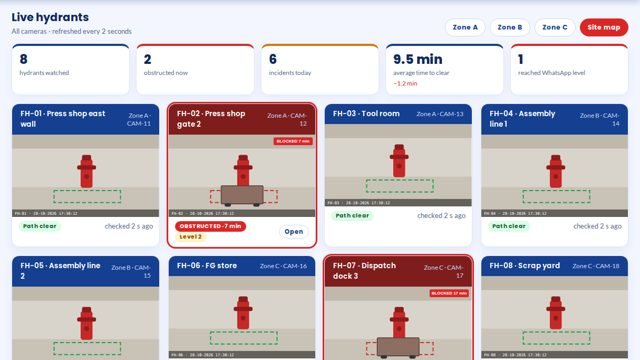
Fire Safety — Hydrant Watch screen 1 in MOS
The screen

What it looks like in MOS

A camera watches each fire hydrant through a virtual line. Anything left on that line raises an alert to the area in-charge, then escalates level by level — up to WhatsApp — until it is cleared, with a record of every obstruction and how long it stayed.

Download the one-pagerRequest a POC
What it does

In plain words

A camera watches each fire hydrant through a virtual line. Anything left on that line raises an alert to the area in-charge, then escalates level by level — up to WhatsApp — until it is cleared, with a record of every obstruction and how long it stayed.

What it does for you
  • Virtual line drawn around each hydrant
  • Obstruction alert within seconds
  • Escalation level by level, up to WhatsApp
  • Time to clear every obstruction
  • Zone-wise reports
  • Runs on cameras the plant already has

What it connects to

  • Existing IP cameras
  • A GPU machine on the plant network
  • WhatsApp for escalation

Where it runs today

  • Fire safety pilot — hydrant virtual line with zone-wise escalation
How it works

From the shop floor to the screen, in four steps

Draw the line

A virtual line is drawn around each hydrant on an existing camera.

Watch

Anything left on the line is noticed within seconds.

Escalate

The area in-charge is alerted first, then the next level, up to WhatsApp.

Close

The alert closes when the path is clear; the time to clear is recorded.

The screens

What you see in MOS

  1. Hydrant board — every hydrant, live
  2. Open obstructions and their level
  3. History with snapshots
  4. Zone reports
The numbers

What it measures for you

Obstructions per zoneTime to clearEscalations by levelRepeat locations

Every figure comes from the machine, the camera or the station itself — recorded as it happens, not typed in at the end of the shift.

Who uses it

Everyone sees what their job needs

Area in-charge

The first alert, with the snapshot

Safety officer

Open obstructions and escalations

Plant head

Zones that keep blocking hydrants

Auditors

A record of every obstruction

On site

What is needed in your plant

At each hydrant

A view from a camera the plant already has, or a new one.

In the plant

A GPU machine on the plant network.

For escalation

The people for each level, and WhatsApp numbers.

Rollout

From the first day to the first month

Day one

Lines drawn

A virtual line around each hydrant on its camera.

Week one

Escalation set

Who is told first, next and last, and after how long.

Month one

Every hydrant watched

Reports by zone and time to clear.

Questions

Asked about Fire Safety — Hydrant Watch

Does a person walking past trigger it?

No. Only something left on the line for longer than the set time raises an alert.

Can we use our CCTV?

Yes, where the camera sees the hydrant and its path.

Works with

The rest of MOS

Request a POC

See it on your own machine.

Tell us about your plant and what you want to see. We visit, connect one machine or station, and you watch your own data in MOS before anything is quoted.

  • A plant visit to see the line and the problem
  • One machine or station connected as a proof of concept
  • Your own data, live, on MOS screens
  • Scope, modules and timeline agreed in writing only after that
Thank you — request received.We will call you shortly to plan the visit.