MOS / Modules / Quality
Proof of concept

Visual Quality Inspection

Every part judged by camera in under a second, defect circled.

Request a POCSee the screen
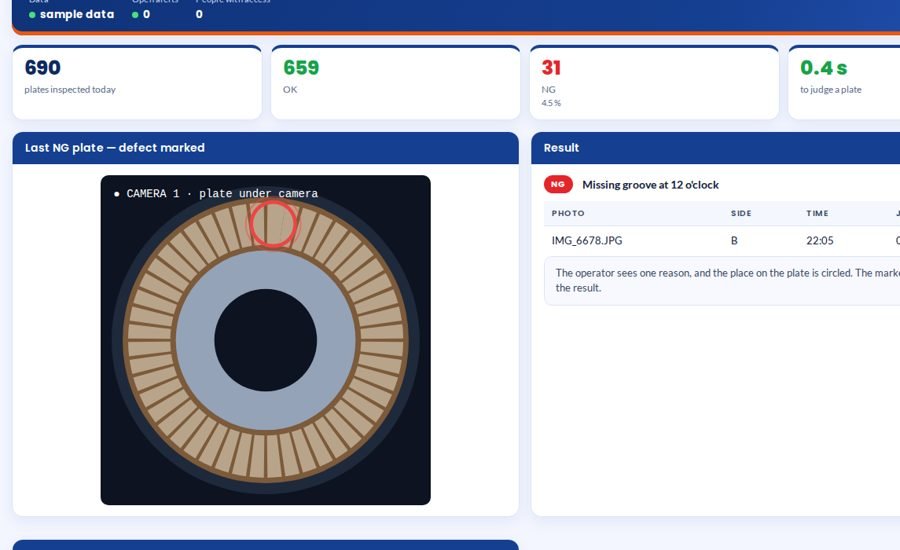
Visual Quality Inspection screen 1 in MOS
The screen

What it looks like in MOS

A camera over the part judges every piece and circles the defect, with one reason the operator understands. The check compares each part with itself, so it keeps working when the material colour changes, and it is built for the plant as it is — the part simply placed under the camera, no jig and no special lamp.

Download the one-pagerRequest a POC
What it does

In plain words

A camera over the part judges every piece and circles the defect, with one reason the operator understands. The check compares each part with itself, so it keeps working when the material colour changes, and it is built for the plant as it is — the part simply placed under the camera, no jig and no special lamp.

What it does for you
  • OK / NG per part with the defect circled
  • One reason per part
  • Independent of material colour
  • No jig, fixed height or special lamp needed
  • Marked picture saved with every result
  • Defects by reason and by position

What it connects to

  • A camera over the part — a phone camera for trials, an industrial camera on the line
  • A PC at the station

Where it runs today

  • Clutch friction plates (proof of concept) — pads equally spaced, equal in shape, none missing, none wrongly pasted; 0.3–0.5 s per plate
How it works

From the shop floor to the screen, in four steps

Place

The part is simply placed under the camera — no jig, no special lamp.

Find and measure

MOS finds the part, then measures every feature against the other features of the same part.

Judge

OK or NG in under a second, with one reason and the defect circled.

Record

The marked picture is saved with the result; defects are counted by reason and by position.

The screens

What you see in MOS

  1. Live station — part, verdict, defect circled
  2. Results with the marked picture
  3. Defects by reason and by position
  4. What is checked
The numbers

What it measures for you

Parts inspected, OK, NGNG by reason and positionTime to judge a partReject trend by shift

Every figure comes from the machine, the camera or the station itself — recorded as it happens, not typed in at the end of the shift.

Who uses it

Everyone sees what their job needs

Operator

OK / NG at once, with where and why

Quality

Every result with its picture

Production

Reject rate by shift

Supplier quality

Defect patterns to send back

On site

What is needed in your plant

Over the part

A camera — a phone camera for trials, an industrial camera on the line.

On site

A PC at the station. No jig, fixed height or special lamp needed.

To start

Good parts and marked bad parts from your own production.

Rollout

From the first day to the first month

Day one

Defects defined

What is NG, with your own marked parts.

Week one

Trial on your parts

Every photo judged; results compared with your inspectors.

Month one

On the line

Live at the station, results and pictures saved per part.

Questions

Asked about Visual Quality Inspection

What if the material colour changes?

Each part is compared with itself — pad against pad on the same plate — so colour does not decide the verdict.

How many reasons does the operator see?

One. The place on the part is circled.

Works with

The rest of MOS

Request a POC

See it on your own machine.

Tell us about your plant and what you want to see. We visit, connect one machine or station, and you watch your own data in MOS before anything is quoted.

  • A plant visit to see the line and the problem
  • One machine or station connected as a proof of concept
  • Your own data, live, on MOS screens
  • Scope, modules and timeline agreed in writing only after that
Thank you — request received.We will call you shortly to plan the visit.