MOS / Modules / Quality
VISUAL QC BY MOS
Proof of concept

Visual Quality Inspection

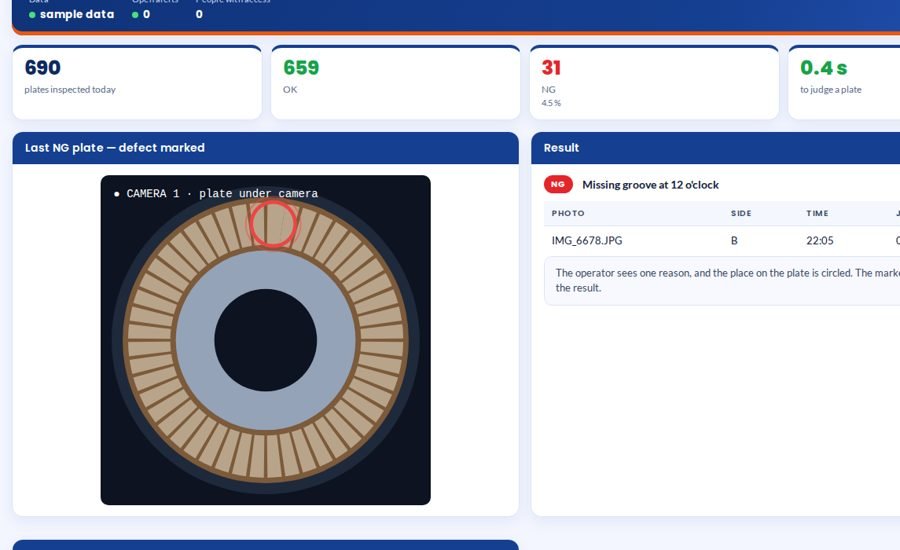
Every part judged by camera in under a second, defect circled.

Under a secondDefect circledColour-independentNo jig / no lampPicture saved
See it on my machineSee the screen
Visual Quality Inspection screen 1 in MOS
The screen

What it looks like in MOS

A camera over the part judges every piece and circles the defect, with one reason the operator understands. The check compares each part with itself, so it keeps working when the material colour changes, and it is built for the plant as it is — the part simply placed under the camera, no jig and no special lamp.

Download the one-pagerSee it on my machine
Product positioning

Manual inspection misses what it is tired of seeing

A pad missing, a segment misplaced — the hundredth plate looks like the first to a tired eye.

“A camera judges every part against itself, circles the defect with one reason, works across material colours, and needs no jig or special lamp.”
Today
PartSample checkRest of the lotCustomerfound by the customer
With Visual Quality Inspection
PartCameraVerdict in under a secondNG spurevery part judged

Drawn, not promised: the top row is sampling — a defect is caught only if the sample happens to include it. The bottom row is every part under the camera, one verdict each, and NG never mixing back into good stock.

End-to-end flow

5 connected stages

Hover or tap a stage to see what is captured there.

01

Place

Under the camera
  • No jig
  • No special lamp
  • Any colour
02

Judge

Against itself
  • Pads, grooves, spacing
  • Equal in shape
  • None missing
03

Mark

Defect circled
  • One reason
  • Picture saved
  • Under a second
04

Decide

OK / NG
  • At the station
  • Tied to the part
  • Operator sees it
05

Learn

Trends
  • Defects by reason
  • By position
  • Per shift
Continuous threadPlace→Judge→Mark→Decide→Learn
Part of the platform

Visual Quality Inspection runs on MOS

Not a standalone tool — a product on the MOS platform, sharing one login, one set of people and roles, and one database with every other module. The lit layers are the ones this product uses; the signal path shows how data moves through them.

  • MOS Edge runs inside the plant — interlocks and screens keep working if the internet does not.
  • MOS Central is a one-way mirror for head office and every plant in one view.
  • Your IT never opens an inbound port.
MOS CentralEvery plant, one view
MOS EdgeYour plant serverin use
MOS CoreThe operating layerin use
MOS ConnectMachine connectivity
MOS VisionAI on the linein use
Core engine & extensions

What is core, what extends it, what is not claimed yet

The honest map, drawn as one thread. Filled nodes are in the product today; outlined nodes are other MOS modules on the same platform; dotted nodes are roadmap and never represented as available until built. Hover a node.

● Core

● Core — in the product today○ Extension — another MOS module◌ Roadmap — not claimed
Native engine

Core functionalities

Each card ends with the thing itself as it appears in MOS — not a description of it.

See

As the plant is

  • Part simply placed
  • No jig, no fixed height
  • No special lamp
  • Works across colours
Judge

Against the part itself

  • Pads equally spaced
  • Equal in shape
  • None missing
  • None wrongly placed
Mark

So the operator understands

  • Defect circled
  • One reason
  • Picture saved
  • Under a second
Learn

Over time

  • Defects by reason
  • By position
  • Per shift and lot
  • Samples & training
Operational journey

6-step digital thread

Step through it or let it play. Each step: who does it, on what, what is captured, and the check that guards it.

Step 1 / 6
Step 1 · Quality

Collect samples

Known-good and known-bad parts are photographed as samples for the part type.

WhereSamples screen
CapturedSample set
Guard / interlock—
● live in MOS
Where it sits

Your ERP or Tally runs the books. This adds the ground truth.

Your ERP / Tally typically givesVisual Quality Inspection adds
A tired eye on the hundredth partEvery part judged the same way
A defect described in wordsThe defect circled on the picture
A jig and a light box per partThe part placed as it is
A reject rate per shiftDefects by reason and position
Hardware & connectivity

Works with what a plant already has

Camera

A camera over the part — a phone camera for trials, an industrial camera on the line

Compute

A PC at the station

Server

MOS Edge for results and trends

Nothing else

No jig, no fixed height, no special lamp

At a glance

The spec

What it connects to, where it runs and what it gives you — the short version your IT and your plant head both want.

ReadsA camera over the part (phone for trials, industrial on the line)
Runs onMOS Vision — a PC at the station
Needs on siteA camera and a PC; the part simply placed under it
OutputsOK/NG per part with the defect circled, one reason, saved image, defect trends
Licensed byPer station
Capability transparency

What is built, what extends, what is not claimed

Core — today

Part judging, defect marking, OK/NG, trends, samples & training.

Extension

MOS MES stores the result on the serial or lot.

Integration-dependent

Camera and mounting are set per part at installation.

Roadmap

Reject diverter control — not represented as available.

Capabilities depend on the plant's process and what is connected at site. Nothing on this page is represented as available until it is built and running.

What you get

5 outcomes

OK / NG under a second Defect circled, one reason Independent of colour No jig, no special lamp Picture saved per part
Who uses it

Everyone sees what their job needs

Operator

OK / NG at once, with where and why

Quality

Every result with its picture

Production

Reject rate by shift

Supplier quality

Defect patterns to send back

On site

What is needed in your plant

Over the part

A camera — a phone camera for trials, an industrial camera on the line.

On site

A PC at the station. No jig, fixed height or special lamp needed.

To start

Good parts and marked bad parts from your own production.

Rollout

From the first day to the first month

Day one

Defects defined

What is NG, with your own marked parts.

Week one

Trial on your parts

Every photo judged; results compared with your inspectors.

Month one

On the line

Live at the station, results and pictures saved per part.

Questions

Asked about Visual Quality Inspection

What if the material colour changes?

Each part is compared with itself — pad against pad on the same plate — so colour does not decide the verdict.

How many reasons does the operator see?

One. The place on the part is circled.

Works with

The rest of MOS

On your own machine

See it on your own machine.

Tell us about your plant and what you want to see. We visit, connect one machine or station, and you watch your own data in MOS before anything is quoted.

  • A plant visit to see the line and the problem
  • One machine or station connected as a proof of concept
  • Your own data, live, on MOS screens
  • Scope, modules and timeline agreed in writing only after that
Thank you — request received.We will call you shortly to plan the visit.