MOS / Modules / Workforce
OPERATOR VERIFICATION BY MOS
Running in production

Operator Verification with AI

The right trained operator at every critical station — even in mask and goggles.

Mask & goggles OKPrimary / alternateEmpty-stage timeUntrained alertOn a plant GPU
See it on my machineSee the screen
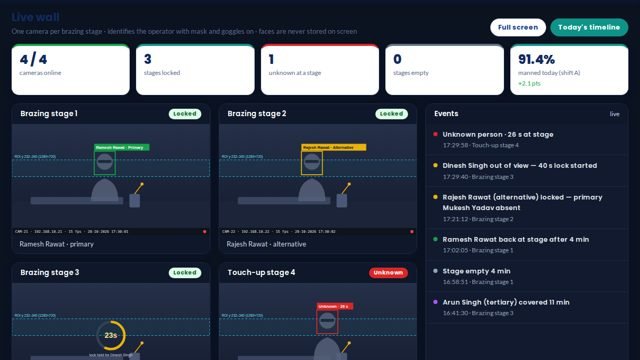
Operator Verification with AI screen 1 in MOS
The screen

What it looks like in MOS

A camera at each critical stage recognises the operator and checks that they are trained and allowed there. It logs who worked where and for how long — primary, alternate, someone else or an unknown face — and how long a stage stood empty, with daily and monthly reports.

Download the one-pagerSee it on my machine
Product positioning

A critical stage run by whoever was free

Brazing and other critical stages are done by whoever is standing there; the record says nothing about who it was or whether they were trained.

“A camera at each critical stage recognises the operator — mask and goggles on — checks they are trained and allowed, and logs who worked where and for how long.”
Today
Shift rosterStationWho workedAudita guess at audit time
With Operator Verification with AI
Camera at the stageRecognisedSkill matrixLoggedverified at the stage

Drawn, not promised: the top row is how plants answer "who was at the brazing stage?" today — from the roster, at audit time. The bottom row is the camera recognising the operator, mask and goggles on, and checking the skill matrix as the shift runs.

End-to-end flow

5 connected stages

Hover or tap a stage to see what is captured there.

01

Enrol

Operators known
  • Photos enrolled
  • Trained-for list
  • Primary / alternate per stage
02

Camera

At the stage
  • Existing IP camera
  • Mask & goggles OK
  • GPU in the plant
03

Recognise

Who is there
  • Primary, alternate
  • Someone else
  • Unknown face
04

Check

Allowed?
  • Trained for this stage
  • Alert if not
  • Empty-stage time
05

Report

Daily / monthly
  • Who worked where
  • How long
  • Untrained events
Continuous threadEnrol→Camera→Recognise→Check→Report
Part of the platform

Operator Verification with AI runs on MOS

Not a standalone tool — a product on the MOS platform, sharing one login, one set of people and roles, and one database with every other module. The lit layers are the ones this product uses; the signal path shows how data moves through them.

  • MOS Edge runs inside the plant — interlocks and screens keep working if the internet does not.
  • MOS Central is a one-way mirror for head office and every plant in one view.
  • Your IT never opens an inbound port.
MOS CentralEvery plant, one viewin use
MOS EdgeYour plant serverin use
MOS CoreThe operating layerin use
MOS ConnectMachine connectivity
MOS VisionAI on the linein use
Core engine & extensions

What is core, what extends it, what is not claimed yet

The honest map, drawn as one thread. Filled nodes are in the product today; outlined nodes are other MOS modules on the same platform; dotted nodes are roadmap and never represented as available until built. Hover a node.

● Core

● Core — in the product today○ Extension — another MOS module◌ Roadmap — not claimed
Native engine

Core functionalities

Each card ends with the thing itself as it appears in MOS — not a description of it.

Recognise

In real plant conditions

  • Masks and safety goggles
  • Existing IP cameras
  • Runs on a plant GPU
  • No wearable, no tag
Classify

Per stage

  • Primary operator
  • Alternate
  • Someone else
  • Unknown face
Alert

When it matters

  • Untrained person at a critical stage
  • Empty stage beyond a limit
  • To the supervisor
  • With the picture
Report

Daily and monthly

  • Who worked where, how long
  • Empty-stage time
  • Untrained events
  • Per stage and shift
Operational journey

7-step digital thread

Step through it or let it play. Each step: who does it, on what, what is captured, and the check that guards it.

Step 1 / 7
Step 1 · HR / supervisor

Enrol operators

Operators are enrolled with photos and the stages they are trained for; primary and alternate per stage.

WhereEnrolment
CapturedFaces, permissions
Guard / interlock—
● live in MOS
Where it sits

Your ERP or Tally runs the books. This adds the ground truth.

Your ERP / Tally typically givesOperator Verification with AI adds
Whoever was free ran the stageThe person at the stage recognised and checked
No record of who did the critical workPresence per stage, per shift, with duration
Found out after the field failureUntrained-at-station alert at the time
Badges that get swappedA face, in mask and goggles
Hardware & connectivity

Works with what a plant already has

Cameras

IP cameras at each critical stage — usually the ones already there

Compute

One GPU machine on the plant network

Server

MOS Edge in the plant

Nothing on the operator

No badge, no wearable

At a glance

The spec

What it connects to, where it runs and what it gives you — the short version your IT and your plant head both want.

ReadsIP cameras at critical stages
Runs onMOS Vision — a GPU machine inside the plant
Needs on siteA camera per critical stage; one GPU PC on the network
OutputsPresence by operator & stage, empty-stage time, untrained-at-station alerts, daily/monthly reports
Licensed byPer camera / per stage
Capability transparency

What is built, what extends, what is not claimed

Core — today

Enrolment, recognition in PPE, presence log, untrained alerts, empty-stage time, reports.

Extension

MOS Skill Matrix supplies who is certified for what.

Integration-dependent

Camera position and lighting are set per stage at installation.

Roadmap

Attendance from stage presence — not represented as available.

Capabilities depend on the plant's process and what is connected at site. Nothing on this page is represented as available until it is built and running.

What you get

5 outcomes

Recognised in mask and goggles Untrained-at-station alerts Empty-stage time Who worked where, how long Runs on a plant GPU
Who uses it

Everyone sees what their job needs

Supervisor

Who is where, right now

Quality

Proof the right person did each critical job

HR

Presence by stage, day and month

Plant head

Untrained-person exceptions

On site

What is needed in your plant

At each stage

An IP camera facing where the operator stands.

In the plant

A GPU machine on the plant network that does the recognition.

For enrolment

A few photos of each operator, taken once.

Rollout

From the first day to the first month

Day one

Cameras placed

Critical stages chosen; cameras aimed and tested.

Week one

Operators enrolled

Every operator enrolled with the stages they are trained for.

Month one

Presence reports

Exceptions, empty-stage time and monthly reports running.

Questions

Asked about Operator Verification with AI

Does it work with masks and goggles?

Yes — it was built on brazing stages where operators wear both.

Where are the face images kept?

On the plant's own GPU machine and server, inside the plant network.

Works with

The rest of MOS

On your own machine

See it on your own machine.

Tell us about your plant and what you want to see. We visit, connect one machine or station, and you watch your own data in MOS before anything is quoted.

  • A plant visit to see the line and the problem
  • One machine or station connected as a proof of concept
  • Your own data, live, on MOS screens
  • Scope, modules and timeline agreed in writing only after that
Thank you — request received.We will call you shortly to plan the visit.