MOS / Modules / Workforce
DOJO TRAINING BY MOS
Available

DOJO Training

New joiners trained, tested and certified before they touch the line.

BatchesAssessmentsCertificatesRe-cert remindersFeeds skill matrix
See it on my machineSee the screen
Product UI showcase

The real screens, not a mock-up

Captures of MOS as it runs — what your supervisor, packer, dispatcher and head office actually see.
mos · dojo training
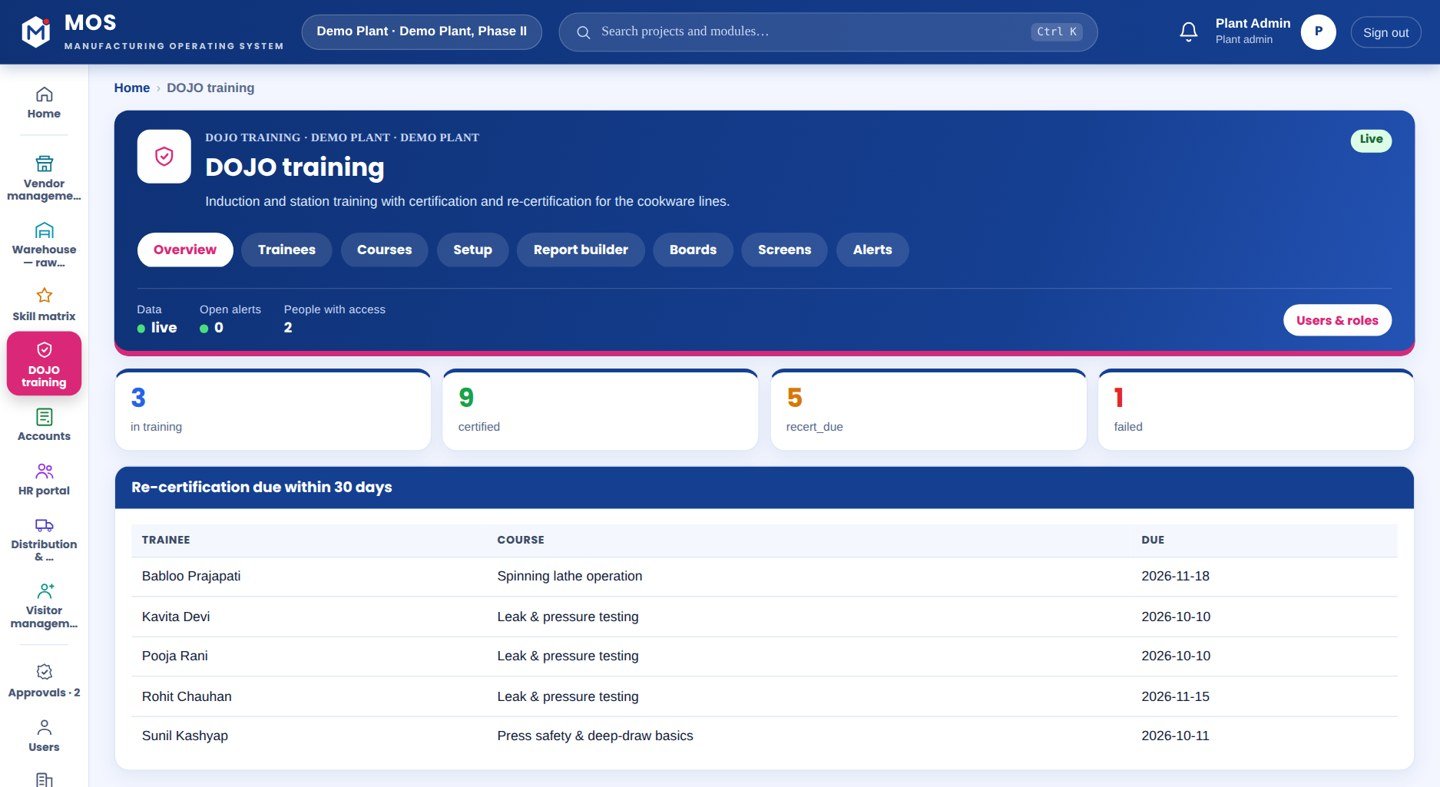
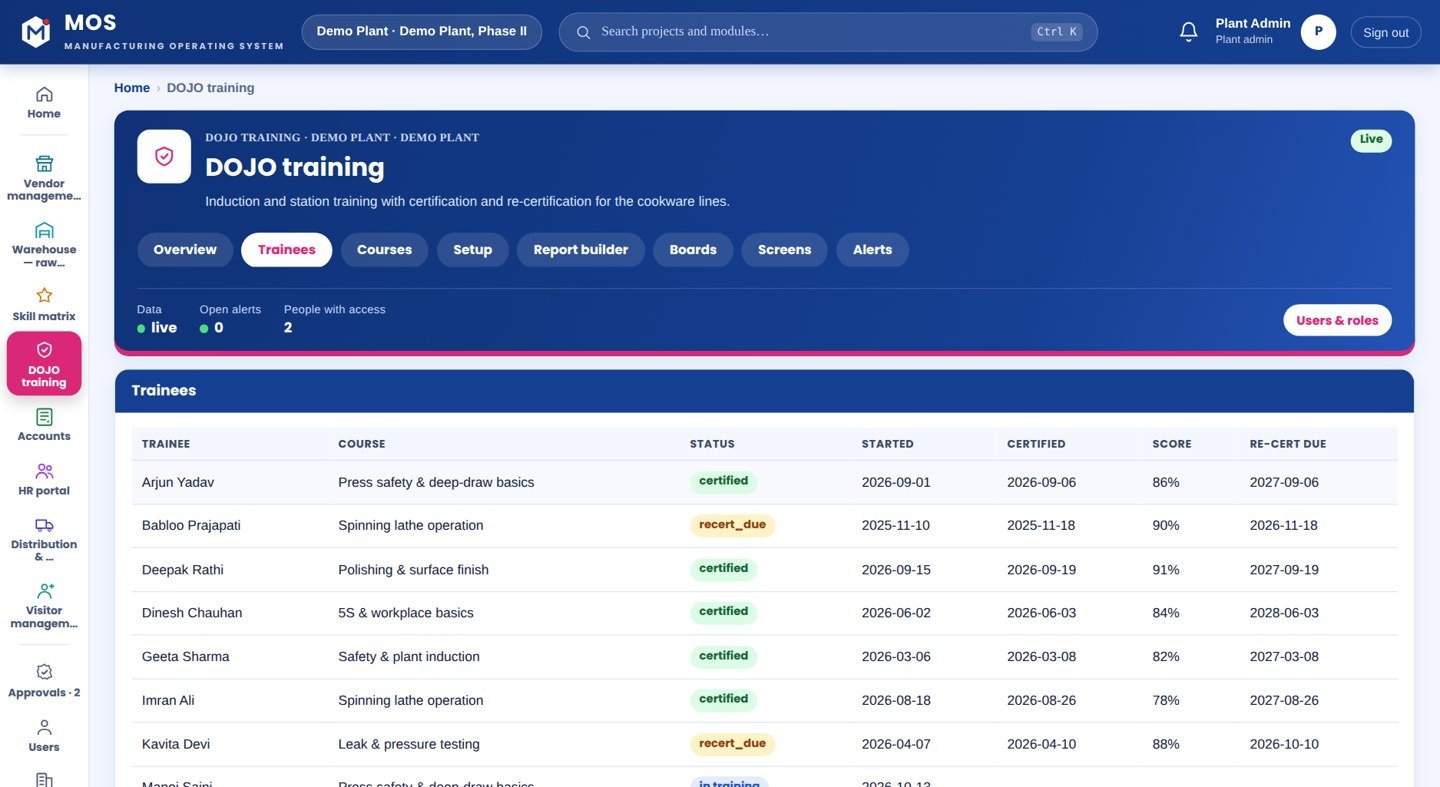
DOJO Training — Overview
Batches in progress

Overview

Every training batch, its curriculum and where each trainee stands.

  • Batches and progress
  • Pass marks per course
  • Certificates due
See it on my machine
Product positioning

Trained on the line, by the line

New joiners learn by doing on live production; the mistakes are on real parts.

“Training batches, curriculum, practical and written assessments, certificates and re-certification reminders — feeding the skill matrix.”
Today
New joinerOn the lineMistakeRetraininglearned on the product
With DOJO Training
DOJOTestCertifiedSkill matrixcertified before the line

Drawn, not promised: the top row is a new joiner learning on the product, with the mistake found later. The bottom row is training and a test in the DOJO first, and the certification feeding the skill matrix that decides who runs which station.

End-to-end flow

5 connected stages

Hover or tap a stage to see what is captured there.

01

Batch

New joiners grouped
  • Enrolment
  • Trainer
  • Start date
02

Train

Curriculum
  • Theory
  • Practice in the DOJO cell
  • Per station
03

Assess

Written & practical
  • Scores recorded
  • Pass marks
  • Retake
04

Certify

Issued
  • Certificate
  • Feeds the skill matrix
  • Allowed on the line
05

Re-certify

Reminded
  • Due dates
  • Reminders
  • Record kept
Continuous threadBatch→Train→Assess→Certify→Re-certify
Part of the platform

DOJO Training runs on MOS

Not a standalone tool — a product on the MOS platform, sharing one login, one set of people and roles, and one database with every other module. The lit layers are the ones this product uses; the signal path shows how data moves through them.

  • MOS Edge runs inside the plant — interlocks and screens keep working if the internet does not.
  • MOS Central is a one-way mirror for head office and every plant in one view.
  • Your IT never opens an inbound port.
MOS CentralEvery plant, one view
MOS EdgeYour plant server
MOS CoreThe operating layerin use
MOS ConnectMachine connectivity
MOS VisionAI on the line
Core engine & extensions

What is core, what extends it, what is not claimed yet

The honest map, drawn as one thread. Filled nodes are in the product today; outlined nodes are other MOS modules on the same platform; dotted nodes are roadmap and never represented as available until built. Hover a node.

● Core

● Core — in the product today○ Extension — another MOS module◌ Roadmap — not claimed
Native engine

Core functionalities

Each card ends with the thing itself as it appears in MOS — not a description of it.

Batch

Group and plan

  • New joiners enrolled
  • Trainer assigned
  • Curriculum per station
  • Dates
Train & assess

Theory and practice

  • Written assessment
  • Practical assessment
  • Scores and pass marks
  • Retakes
Certify

To the line

  • Certificate issued
  • Feeds the skill matrix
  • Allowed at the station
  • Record kept
Keep current

Over time

  • Re-certification due dates
  • Reminders
  • Movers to a new station
  • History per person
Operational journey

6-step digital thread

Step through it or let it play. Each step: who does it, on what, what is captured, and the check that guards it.

Step 1 / 6
Step 1 · HR / trainer

Set the curriculum

Topics, practicals and pass marks per station or skill.

WhereCourses
CapturedCurriculum
Guard / interlock—
● live in MOS
Where it sits

Your ERP or Tally runs the books. This adds the ground truth.

Your ERP / Tally typically givesDOJO Training adds
Learning on live productionTrained and assessed before the line
A certificate in a fileA certificate that updates the skill matrix
Re-training when someone remembersRe-certification reminded automatically
Training records on paperScores and history per person
Hardware & connectivity

Works with what a plant already has

Training area

Benches or a cell where practice happens

A screen

For curriculum and results

Server

MOS Core on the plant server

Nothing else

No device, no sensor

At a glance

The spec

What it connects to, where it runs and what it gives you — the short version your IT and your plant head both want.

ReadsHR master
Runs onMOS Core
Needs on siteA training area and a screen
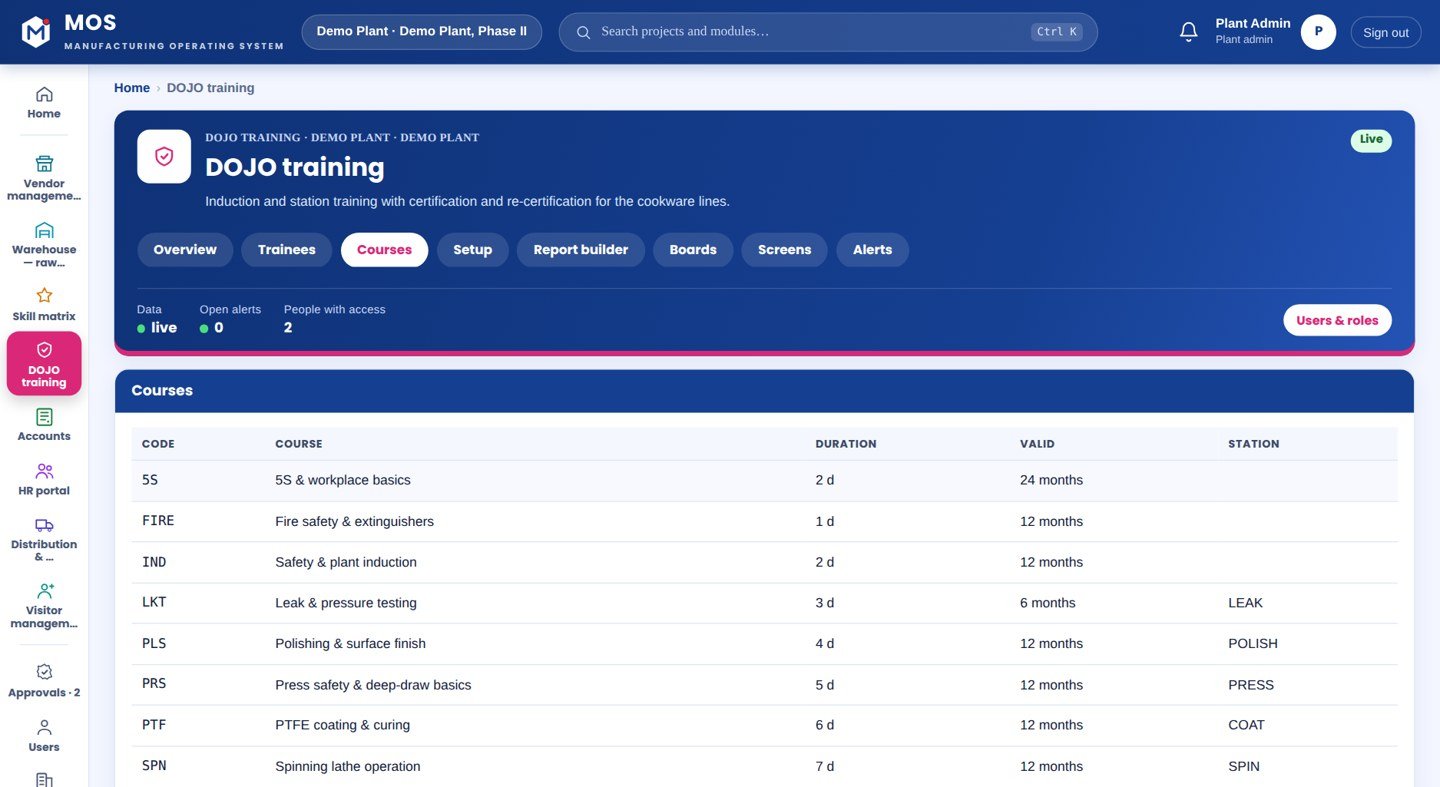
OutputsBatches, assessments, certificates, re-certification reminders
Licensed byPer plant
Capability transparency

What is built, what extends, what is not claimed

Core — today

Batches, curriculum, written and practical assessments, certificates, re-certification reminders.

Extension

MOS Skill Matrix is updated by certification.

Integration-dependent

None.

Roadmap

E-learning content delivery — not represented as available.

Capabilities depend on the plant's process and what is connected at site. Nothing on this page is represented as available until it is built and running.

What you get

5 outcomes

Batches and curriculum Practical and written assessments Certificates Re-certification reminders Feeds the skill matrix
Who uses it

Everyone sees what their job needs

Trainer

Batch progress and results

HR

Certified operators

Supervisor

Who is ready for the line

On site

What is needed in your plant

A training area

Benches or a cell where practice happens.

A screen

For curriculum and results.

In the plant

The MOS plant server.

Rollout

From the first day to the first month

Day one

Curriculum set

Topics, practicals and pass marks per station.

Week one

First batch

Trainees enrolled; assessments recorded.

Month one

Certified to the line

Certificates issued and fed into the skill matrix.

Questions

Asked about DOJO Training

Can existing operators be re-certified?

Yes — re-certification is reminded and recorded the same way.

Is it only for new joiners?

No — any operator moving to a new station goes through it.

Works with

The rest of MOS

On your own machine

See it on your own machine.

Tell us about your plant and what you want to see. We visit, connect one machine or station, and you watch your own data in MOS before anything is quoted.

  • A plant visit to see the line and the problem
  • One machine or station connected as a proof of concept
  • Your own data, live, on MOS screens
  • Scope, modules and timeline agreed in writing only after that
Thank you — request received.We will call you shortly to plan the visit.